
Comprehensive SEO Audit Guide: 8 Steps to Improve Rankings & AI Visibility

Thanks for reading! I hope you enjoyed reading and learning more about digital marketing, SEO, and how to increase your visibility online.
Author: Patrick Michaels | Lead Content Strategist at Search Miners
An SEO audit helps you find the problems that may be stopping your website from getting better search rankings and more organic traffic. It checks your technical SEO, on-page SEO, content, backlinks, local SEO, and AI search visibility.
Many website owners struggle with low traffic, falling rankings, poor website performance, or pages that do not appear in search results. The problem is often not one single issue.
Your site may have technical errors, weak content, poor internal links, missing on-page elements or low-quality backlinks. Or you can have content that is not useful enough for search engines and AI search tools.
Without a proper SEO audit, it can be difficult to know where the real problem is.
Search Miners offers comprehensive SEO Audits to assess every important aspect of your website.
We review technical SEO, keyword optimization, content quality, internal linking, backlinks, local search signals, and AI search readiness.
We then turn our findings into simple, clear actions so you know what to fix and how those changes can improve your search visibility.
What Is an SEO Audit?
An SEO audit is a comprehensive review of a website’s ability to rank, get crawled, get indexed, and satisfy search intent.
It examines the technical infrastructure, the content itself, and external signals such as backlinks that influence how search engines evaluate a site.
What Does an SEO Audit Include?
A complete audit typically reviews six areas:
- Technical health
- On-page elements
- Content quality
- Backlink profile
- Local search presence (if relevant)
- Increasingly, how well content performs in AI-driven search results.
Each area uncovers different types of issues.
Technical audits catch crawl and indexing problems. Content audits catch thin or outdated pages.
Backlink audits catch toxic links or missed opportunities. No single area tells the whole story on its own.
What is the Importance of SEO Audits?
Search engines change constantly, and so do websites. New pages get added, plugins get updated, content ages, and competitors publish new material. Small issues accumulate quietly until they show up as a ranking or traffic problem.
A Backlinko analysis of ranking factors found that many technical issues, such as missing canonical tags or slow Core Web Vitals scores, go unnoticed for months because nothing about the site appears visibly broken. Regular audits catch these issues before they compound.

Is Your Website Ready for the AI Search Era?
Traditional SEO isn’t enough anymore. ChatGPT, Gemini, and AI Overview are changing how customers find businesses. Our GEO and semantic optimization strategies ensure you’re visible everywhere your customers are searching.
Stay ahead of the competition with cutting-edge optimization.
When Should You Perform an SEO Audit?
You do not have to wait for your rankings or traffic to drop before running an SEO audit.
Regular audits help you find SEO issues early and keep your website healthy.
However, some situations make an SEO audit especially important.
Before a Website Redesign
A website redesign can affect your SEO if URLs change, pages are removed, or important content is lost.
An audit before the redesign gives you a clear record of your current SEO performance and helps ensure that important pages, keywords, links, and technical settings are preserved.
After a Google Core Update
A Google Core Update can change how pages are evaluated in search results.
If your rankings or organic traffic change after an update, an SEO audit can help you find content quality, relevance, or technical issues that may need attention.
When Traffic or Rankings Drop
A sudden or gradual drop in organic traffic can have many causes. Technical errors, lost backlinks, indexing problems, content changes, or search algorithm updates may all play a role.
An audit helps you identify the root cause rather than making random changes.
During a Website Migration
Moving to a new domain, changing your website platform, or switching from HTTP to HTTPS can create SEO problems if not handled correctly.
An audit can help check redirects, URLs, canonical tags, internal links, XML sitemaps, and other important SEO elements before and after the migration.
As Part of Regular SEO Maintenance
You do not need to wait for a problem to run an SEO audit. A quarterly or twice-yearly audit can help you find broken links, indexing issues, outdated content, technical errors, and other problems before they affect your search rankings.
7 Types of SEO Audits
Not every audit needs to cover everything. Understanding the different types helps you scope the right audit for the situation.
1- Technical SEO Audit
Reviews the infrastructure that determines whether search engines can crawl, render, and index your site properly. This includes site speed, mobile-friendliness, crawlability, and indexation status.
2- On-Page SEO Audit
Reviews individual page elements: title tags, meta descriptions, heading structure, keyword targeting, and internal linking. This is where search-intent alignment is evaluated page by page.
3- Content Audit
Reviews the quality, depth, and relevance of the content itself. This includes identifying thin pages, outdated information, duplicate content, and gaps in topical coverage.
4- Off-Page SEO Audit
Reviews external signals, primarily backlinks, that influence authority and trust. This includes link quality, toxic link identification, and competitor link comparisons.
5- Local SEO Audit
Reviews Google Business Profile optimization, NAP (name, address, phone) consistency, local schema, and location-specific content for businesses that depend on local search visibility.
6- E-commerce SEO Audit
Reviews product and category page structure, duplicate product descriptions, faceted navigation issues, and product schema, all specific to online stores.
7- GEO & AI Search Audit
Reviews how well a site’s content is positioned to be cited or referenced in AI-generated answers from tools like Google’s AI Overviews, ChatGPT, or Perplexity. This is a newer audit layer that traditional SEO audits often miss entirely.
How to Perform an SEO Audit?
A good SEO audit starts with the biggest problems first. There is no point rewriting a page if Google cannot crawl or index it.
Follow these 8 steps to assess your website’s SEO health and identify issues that can affect rankings, traffic, and AI visibility.
Step 1: Check Organic Traffic and Rankings
Start by checking how your website is performing in organic search.
Use Google Search Console to review clicks, impressions, average position, and the queries that bring visitors to your site as part of a broad SEO strategy.
Look at the last 12 months and compare your current performance with previous periods. Check for sudden traffic or ranking drops. Then compare those dates with major Google updates or important website changes.
If your organic traffic dropped by 30% in March, check which pages lost traffic and which keywords were affected. This gives you a starting point for the rest of the audit.
For competitor research, tools such as Ahrefs can estimate competitors’ organic traffic and show the keywords and pages bringing them search traffic.
Keep in mind that third-party traffic numbers are estimates, not exact figures.
Step 2: Check Crawlability and Indexing
Before looking at keywords or content, make sure search engines can find your important pages. Check:
- Robots.txt
- XML sitemap
- Noindex tags
- Canonical tags
- Crawl errors
- Redirects
- Indexed pages
You can also use a site:yourwebsite.com search to get a quick idea of which pages Google has indexed.
You have 500 important product pages, but only 350 appear to be indexed. That gap needs investigation.
Step 3: Audit Technical SEO
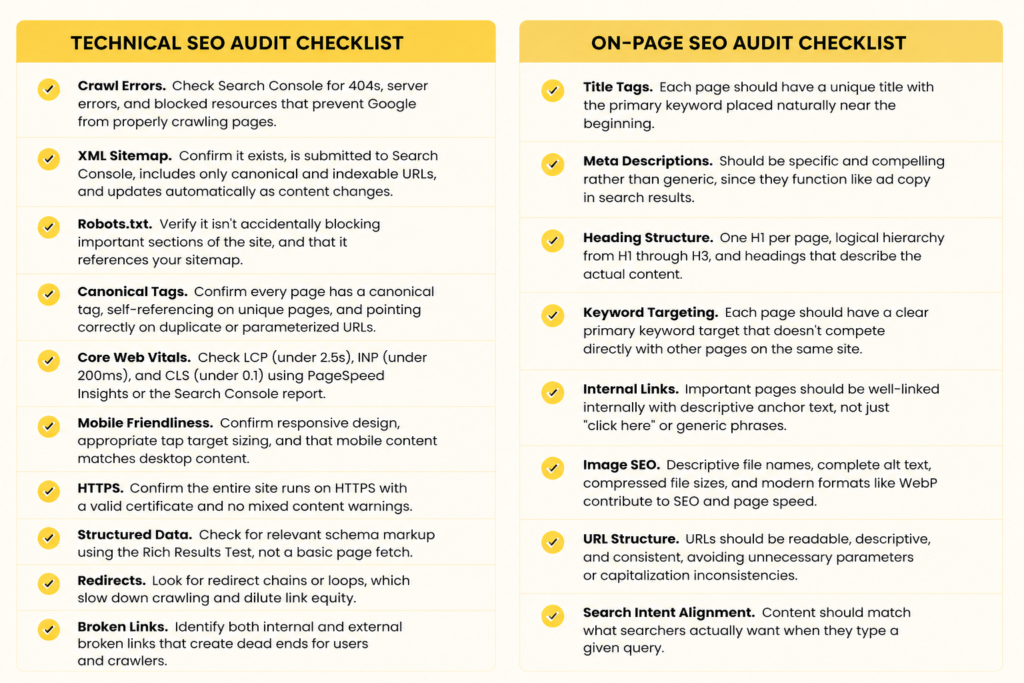
Technical SEO affects how search engines crawl, understand, and access your website. Review your site’s page speed, mobile experience, HTTPS, Core Web Vitals, redirects, broken links, and structured data.
Google’s Core Web Vitals focus on loading performance, responsiveness, and visual stability.
They are useful metrics for checking the page experience users get on your site.
Look for issues such as:
- Slow-loading pages
- Poor mobile usability
- Broken internal links
- Redirect chains
- Missing HTTPS
- Incorrect structured data
- Duplicate URLs
If five versions of the same page are accessible via different URLs, search engines may have trouble determining which version to index.
Step 4: Review On-Page SEO
Now check how each important page is optimized for its target keyword and search intent. Review:
- Title tags
- Meta descriptions
- H1 and H2 headings
- Keyword placement
- URL structure
- Image alt text
- Internal links
- Search intent
Do not force keywords into every sentence. Make sure the page clearly answers what the searcher wants to know.
You can also use semantic SEO to cover related topics, entities, questions, and concepts that help search engines understand the full context of a page.
If someone searches for “best accounting software for small businesses,” a page that only defines accounting software may not fully match the search intent. It may need comparisons, features, pricing, and recommendations.
Step 5: Check Content Quality
Your content should be useful, accurate, original, and relevant to your audience. Look for pages that are thin, outdated, duplicated, or no longer match what people are searching for.
Google recommends creating helpful, reliable, people-first content rather than content made mainly to attract search traffic.
Ask:
- Does this page answer the main question?
- Is the information still accurate?
- Does it offer something original?
- Does it show real experience or expertise?
- Can another page on the site be combined with it?
A 2022 guide about social media marketing may contain outdated platform features and statistics. Updating it can make the page more useful and relevant.
Step 6: Audit Internal Links
Internal links help users and search engines discover important pages. They also help show which pages are most important on your website.
Look for:
- Orphan pages
- Broken internal links
- Pages with very few internal links
- Generic anchor text such as “click here”
- Important pages that are difficult to reach
If your main “SEO Services” page is only linked from the footer, add relevant links from blog posts and other important service pages.
A simple rule is to make your most important pages easy to find through relevant internal links.
Step 7: Review Your Backlinks
Backlinks are links from other websites to your site. A backlink audit helps you understand who is linking to you and whether your link profile has useful, relevant links. Check:
- Referring domains
- Link quality
- Relevant backlinks
- Lost backlinks
- New backlinks
- Suspicious or unnatural patterns
- Competitor backlink gaps
If three competitors have earned links from respected industry publications but your site has none, those websites may reveal useful link-building opportunities.
Do not focus only on the number of backlinks. A smaller number of relevant, trustworthy links can be more useful than a large collection of low-quality links.
Step 8: Check AI Search and GEO Readiness
Search is changing. Your SEO audit should now consider how your content may appear in AI-powered search experiences, such as Google AI Overviews and other AI search tools.
Google says the same core principles still apply to AI search: create unique, helpful content that satisfies visitors.
Check whether your content:
- Answers common questions clearly
- Uses clear headings and sections
- Explains topics in simple language
- Provides original information or insights
- Clearly identifies people, companies, products, and other entities
- Supports important claims with trustworthy sources
- Uses relevant structured data where appropriate
Instead of writing a long paragraph about “how local SEO works,” create clear sections such as “What Is Local SEO?”, “How Does Local SEO Work?”, and “How Can You Improve Local Rankings?”
AI search is becoming an important part of the search landscape.
AI Overviews appeared on about 48% of tracked queries by early 2026, up from roughly 30% a year earlier. At the same time, traditional organic search remains important, with about 52% of those tracked queries showing no AI Overview.
This means an SEO audit should not treat AI visibility as a replacement for traditional SEO. Your website needs a strong foundation for both.
Common SEO Audit Mistakes
An SEO audit is only useful when you focus on the issues that can make a real difference. Avoid these common mistakes when reviewing your website.
1- Fixing Low-Impact Issues First
Not every SEO issue needs immediate attention.
Some problems have little effect on your rankings, while others can affect your entire website.
You spend hours adding keywords to image alt text while important pages are blocked from Google by a noindex tag. The indexing issue should be fixed first.
Avoid relying on SEO shortcuts when a deeper technical or content problem needs attention.
2- Ignoring Search Intent
Using the right keyword does not guarantee that a page will rank. Your content also needs to match search intent, or what users actually want to find.
Someone searches for “best SEO tools for small businesses.” A page that only explains what SEO tools are may not satisfy the searcher. They may expect a list of tools, features, prices, and comparisons.
Before changing your content, check the top-ranking pages and understand the type of content Google is showing for the query.
3- Relying Only on SEO Audit Tools
SEO tools can quickly find broken links, missing meta descriptions, slow pages, duplicate content, crawl errors, and other technical issues. However, a tool report is not the final answer.
An audit tool may flag a long URL as an issue. If the URL is clear, descriptive, and already performing well, changing it may create more risk than value.
Use tools to find potential problems, then review each issue manually.
Look at the page, its purpose, traffic, rankings, and overall SEO performance before making changes.
4- Forgetting AI Search Visibility
A traditional SEO audit may focus only on Google rankings and organic traffic.
Today, it is also worth checking how clearly your content can be understood and referenced in AI search results and AI-generated answers.
A detailed guide may rank well but still be difficult for AI systems to use if important answers are buried in long paragraphs.
Clear headings, direct answers, useful facts, and well-structured content can make information easier to understand.
Google also recommends focusing on unique, helpful, people-first content for AI search experiences rather than creating content only to appear in AI results.
5- Skipping Post-Fix Validation
Fixing an SEO issue is not the final step. You should check whether the fix actually worked.
You discover that an important page is blocked by robots.txt and remove the block. The job is not finished. Check the URL again, request indexing when appropriate, and monitor the page in Google Search Console.
After making changes, review indexing status, crawl errors, rankings, organic traffic, Core Web Vitals, and other relevant SEO metrics.
This helps confirm that the problem is resolved and that the fix did not create a new issue.
Conclusion
SEO audits aren’t a one-time checklist you complete and forget. Search engines evolve, competitors publish new content, and websites accumulate small technical issues over time. Skipping regular audits means discovering problems only after they’ve already cost you traffic.
Running through technical, on-page, content, backlink, local, and AI search readiness checks on a consistent schedule keeps small issues from becoming large ones.
If you’d rather have an experienced team handle the process, Search Miners offers full SEO audit services built around this exact framework.
Reach out to get a comprehensive audit of your site and a clear action plan for what to fix first.
Frequently Asked Questions
How often should you perform an SEO audit?
Most sites benefit from a full audit every quarter, with lighter monthly checks in between. High-competition industries or larger sites often need more frequent review.
How long does an SEO audit take?
A basic audit can take a few hours for a small site. A comprehensive audit covering technical, content, backlinks, and AI search readiness for a larger site typically takes one to two weeks.
Can I perform an SEO audit myself?
Yes, with the right tools and a structured checklist like this one. Larger or more technical sites often benefit from a professional audit to catch issues that require deeper knowledge of the platform or development.
What are the best SEO audit tools?
Google Search Console and Google Analytics 4 are essential starting points. Screaming Frog, Ahrefs, and Semrush add deeper technical and competitive analysis.
What is the difference between a technical SEO audit and a content audit?
A technical audit reviews whether search engines can properly crawl, render, and index your site. A content audit assesses whether the content is comprehensive, up to date, and worth ranking.
How do SEO audits improve AI visibility?
Audits that include a GEO review assess whether content is structured clearly enough to be cited or summarized by AI search tools, a factor traditional audits often overlook entirely.
About Patrick Michaels
Patrick Michaels
Patrick brings 10+ years of SEO expertise and 15+ years of professional writing experience to the Search Miners team. He specializes in creating clear, actionable content strategies that drive real business growth.


